

Humanoid Robot Branding Mockup Set
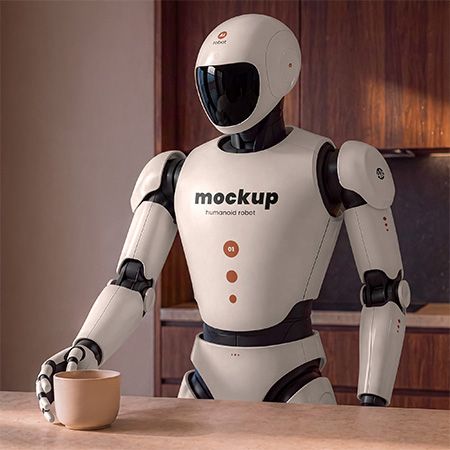
Present your branding with a Humanoid Robot Mockup Set created for robotics, artificial intelligence, technology and futuristic product identities. This premium mockup collection helps you turn flat logos, typography and graphic systems into realistic branding applied across a humanoid robot.
The set includes 3 layered PSD scenes with different robot interactions and camera views. Each scene gives you seven editable design areas, organized layers and an additional robot color control. Therefore, you can build a complete visual identity across the head, torso, shoulders, arms and pelvis instead of placing one logo on a single surface.
Use this humanoid robot mockup for robotics branding, AI startup presentations, service robot concepts, technology campaigns, portfolio projects, advertising visuals and client presentations.
3 PSD files · 6000 × 4000 px each · 300 DPI · 7 design Smart Objects · Robot color editing
$14.00 $6.99 USD · 50% OFF
Prices exclude taxes. After all, any applicable taxes are added at checkout based on your country. Therefore, you will see the final total before payment.
Digital download · Adobe Photoshop required · Personal and commercial use under the Country4k License.
Present Your Design in Three Ready-Made Scenes
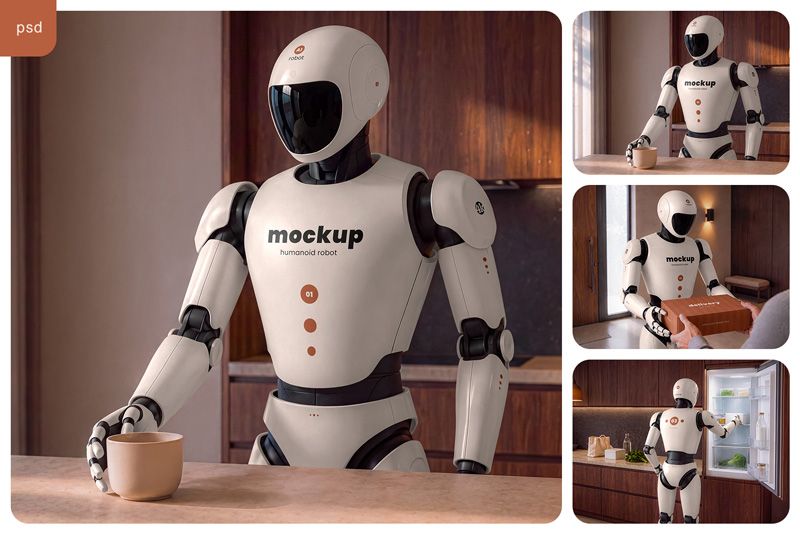
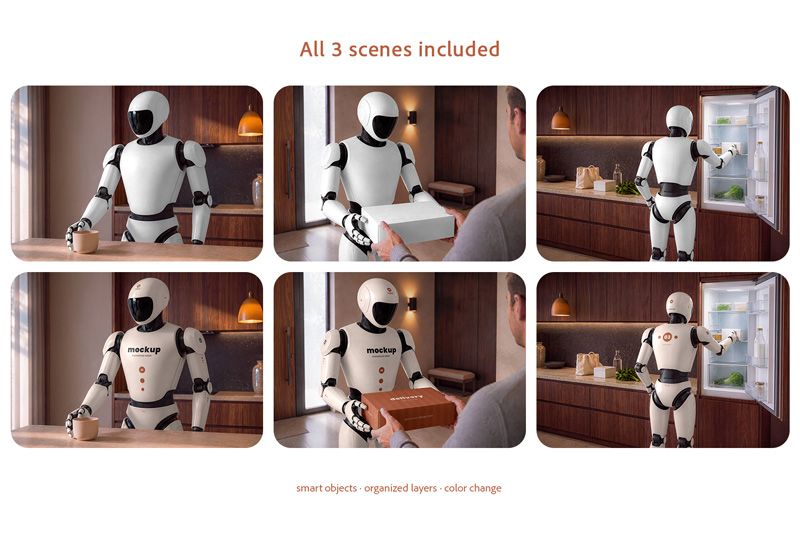
This humanoid robot mockup set includes three complementary PSD scenes. Each composition presents the robot in a different everyday situation, so you can show one branding concept from several perspectives and create a more complete product presentation.
The first scene shows the humanoid robot in a warm home interior with a cup. The large front torso gives you a strong primary branding area, while the head, shoulder, arm and pelvis provide space for secondary logos, typography and graphic elements.
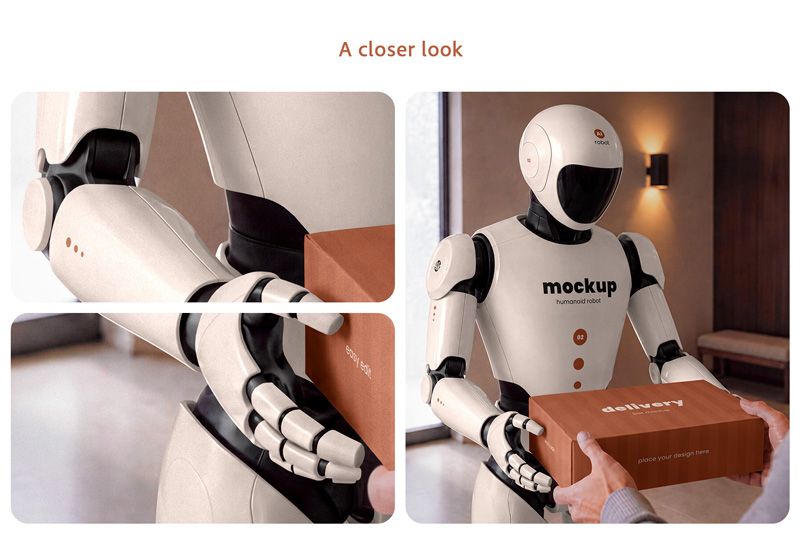
The second scene introduces direct interaction between the robot and a person. The robot hands over a package, making this composition especially useful for service robotics, delivery technology, hospitality, smart home and AI assistant branding.
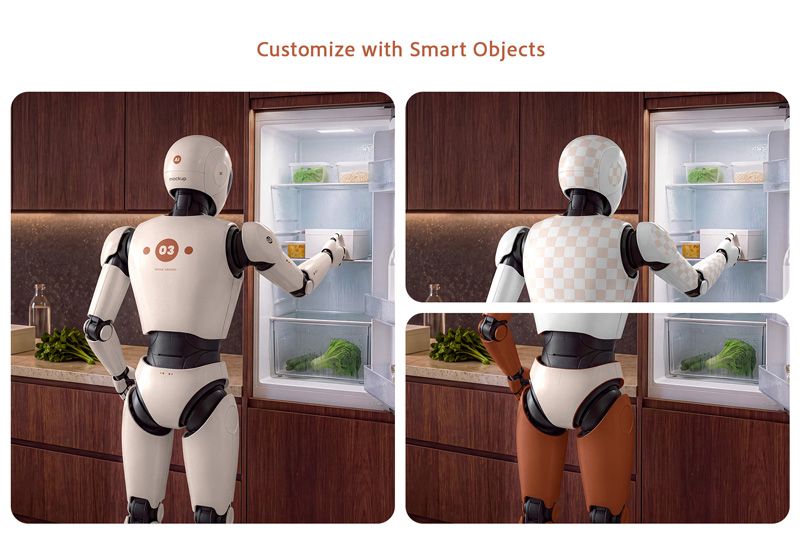
The third scene shows the robot from behind while using a refrigerator. This angle adds dedicated rear design areas and lets you continue your visual identity across the back of the product.
Together, all three scenes help you present the robot as a believable branded product rather than a static technology render.
Easy Customization with Smart Objects
You can customize the robot quickly in Adobe Photoshop. Open the required Smart Object, place your artwork, save it and return to the main PSD. Your design will appear on the selected robot panel while the original lighting, surface shape and visual depth remain visible.
Each scene includes 7 independent design Smart Objects. This gives you much more flexibility than a traditional mockup with only one editable surface.
In the first two scenes, you can customize:
Head Top · Head Side · Torso Front · Shoulder · Upper Arm · Forearm · Pelvis Front
The third scene includes dedicated rear-view areas:
Head Back · Head Side · Torso Back · Shoulder · Upper Arm · Forearm · Pelvis Back
Change the Robot Color
The design is not limited to the original white robot.
An additional editable color control lets you change the robot shell and adapt the product to different brand palettes. Create a dark technology concept, introduce a warmer product color or match the robot to an existing visual identity without rebuilding the entire scene.
The design Smart Objects remain independent from the body color. Therefore, you can experiment with both robot color and branding graphics while keeping the same realistic environment and composition.
High Resolution for Professional Results
Each PSD file comes in 6000 × 4000 px resolution at 300 DPI. The large canvas provides enough detail for professional portfolio presentations, website hero images, client pitches, promotional graphics, advertising visuals and high-resolution digital campaigns.
The resolution also gives you more freedom when creating close-up compositions. Typography, logos, patterns and small graphic elements remain clear when you crop individual areas of the robot.
The files include organized layers and folders, so you can find the main editable elements quickly and spend more time designing instead of searching through a complicated PSD structure.
A Closer Look at the Robot Details
The mockup preserves the details that make the humanoid robot feel like a real physical product. Smooth shell panels, dark mechanical joints, small panel gaps, glossy visor reflections and articulated hands create a believable contrast between hard surfaces and moving parts.
Your artwork follows the shape and visual depth of the robot panels instead of looking like a flat graphic placed over the image. This makes the mockup suitable for both simple logo presentations and more detailed visual identities with typography, symbols, patterns and technical graphics.
The interaction scenes also include carefully refined hands, objects and contact areas. These details help the final presentation feel natural when the robot holds a cup, exchanges a package or interacts with the surrounding environment.
Built for Complete Robot Branding
A humanoid robot offers more branding space than a traditional flat product.
Use the torso as the main visual area. Add secondary marks to the head and shoulders. Extend typography, graphic patterns or technical symbols across the arms and pelvis. Then use the rear scene to continue the identity across the back of the product.
This approach helps you show how a complete visual system behaves on a real object rather than presenting a logo on an isolated white background.
You can keep the branding restrained and minimal or create a more expressive futuristic identity. The neutral robot design gives both approaches enough visual space.
Save Time on Complex Product Visualization
Creating a believable humanoid robot presentation from scratch can require 3D modeling, materials, lighting, rendering, retouching and scene building.
This mockup gives you a ready-made alternative.
Place your design into the prepared Smart Objects, adjust the robot color if needed and use the finished scenes for your presentation. You can focus on the branding concept instead of rebuilding the robot, environment and lighting for every project.
For client work, this also makes it easier to test several visual directions using the same consistent product scenes.
Ideal for Robotics, AI and Technology Branding Projects
Use this humanoid robot mockup set for robotics companies, artificial intelligence projects, AI assistants, smart home products, delivery technology, service robots, futuristic branding, technology startups and experimental identity concepts.
It also works well for logo designers, brand designers, advertising agencies and creative studios that need an unusual physical application for a visual identity.
Create visuals for portfolio case studies, client presentations, landing pages, advertising campaigns, product concepts, social media and experimental graphic design.
Instead of showing a flat logo alone, you can demonstrate how the identity might work on a next-generation physical product.
File details:
- Included files: 3 layered PSD mockups + help file
- Scenes: Home Assistant, Human Interaction and Rear Branding View
- Canvas size: 6000 × 4000 px per PSD
- Resolution setting: 300 DPI
- Design editing: 7 independent Smart Objects per scene
- Additional editing: Robot color control
- Front scenes: Head Top, Head Side, Torso Front, Shoulder, Upper Arm, Forearm, Pelvis Front
- Rear scene: Head Top, Head Side, Torso Back, Shoulder, Upper Arm, Forearm, Pelvis Back
- File organization: Layers and folders
- Software: Adobe Photoshop
- Product type: Digital download
Preview collages are shown for reference and are not included as separate gallery files. Use your own artwork to create the final presentation.
Before you buy
Software: Adobe Photoshop is required to edit the PSD files and Smart Objects.
Scenes: The robot, environments, camera angles and compositions match the scenes shown in the preview images.
Sample designs: Branding shown in the previews is used for demonstration purposes and is not included as a separate design asset.
Digital product: This is a digital download. No physical product will be shipped.
License: You can use the mockups for personal, commercial and client projects under the Country4k Standard License. However, you may not resell or redistribute the source mockup files. Read the full license.
Refunds: You can request a refund within 14 days of purchase. To do so, contact us with your order details.
AI content disclosure: Generative AI was used during the visual development of the original humanoid robot scenes. Selected images were then manually refined, retouched and color-corrected before being converted into commercial Photoshop mockups. Editable robot panels, Smart Objects, artwork integration, robot color control and final PSD organization were prepared specifically for practical design use.
Present Your Next Robot Identity
Turn a flat logo or visual system into a realistic humanoid product presentation.
With three complementary scenes, seven independent design areas and customizable robot color, this Humanoid Robot Mockup Set gives you the flexibility to build a complete robotics identity without creating every product visualization from scratch.
Use it to explore new branding ideas, present technology concepts to clients or add a distinctive futuristic project to your portfolio.
$14.00 $6.99 USD · 50% OFF
Prices exclude taxes. After all, any applicable taxes are added at checkout based on your country. Therefore, you will see the final total before payment.
Contact us with any questions before purchase.